Beat the Desk Slouch! Master the Perfect Plank at Home for Better Posture
Do you find yourself hunching over your desk, shoulders rolled forward, stuck in a “computer posture” after hours of work? Sitting for long periods weakens our core muscles more than we realize, leading to poor posture and fatigue.
If you want to improve your posture but don’t have the time for the gym or complicated workouts, there is a perfect, space-saving exercise you can start today: the Plank. Planks are incredibly efficient because they engage your entire body, not just your abs.
However, despite looking simple, the plank is one of the hardest exercises to perform with correct form. A bad plank not only reduces its effectiveness but can also cause severe lower back pain.
In this article, we will explain why planks are highly effective for fixing bad posture, show you the step-by-step correct form to prevent injury, and share how to use your smartphone’s AI camera as a personal trainer to perfect your form at home!
Why Planks Improve Your Posture: The Mechanics of Aligning Your Spine
Bad posture isn’t just about a curved spine. It happens when your deep “core muscles” weaken and fail to support your skeletal structure against gravity. Doing planks regularly corrects your posture through three key mechanisms:
1. Strengthening your natural corset (deep core muscles): Planks target your deep core muscles, including the transversus abdominis and multifidus. Strengthening these muscles helps you maintain an upright, confident posture naturally, without even thinking about it.
2. Realigning your pelvis and flattening your stomach: Sitting all day tilts your pelvis backward, causing a slouched back and a protruding belly. Planks balance and strengthen your abdominal and glute muscles, resetting your pelvis to its correct position for a flatter stomach and better posture.
3. Stabilizing shoulders to prevent “rounded shoulders”: Planks require you to support your weight on your forearms, activating the muscles around your neck, shoulders, and shoulder blades. This opens up your chest and corrects rounded shoulders caused by computer work.
Correct Plank Form to Avoid Back Pain: Steps and Common Mistakes
Because the plank is a static hold, even a minor misalignment can ruin its benefits. Let’s master the correct form to maximize your workout and prevent injuries.
How to Do a Perfect Plank:
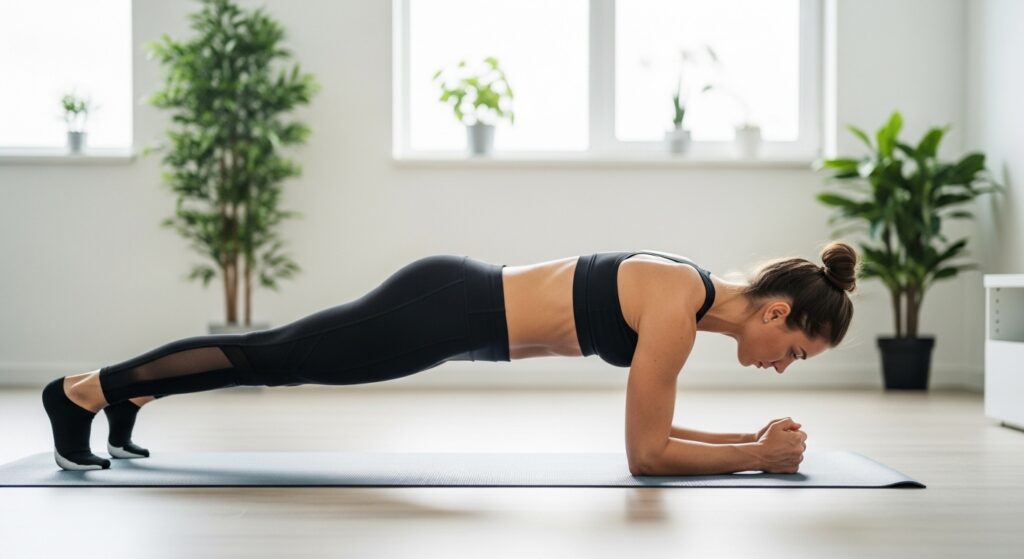
- Lie face down on the floor and place your elbows directly under your shoulders. Keep your elbows at a 90-degree angle with your forearms flat on the floor.
- Tuck your toes and lift your body off the floor. Keep your feet hip-width apart for better stability.
- Keep your body in a straight line from head to heels. Do not hold your breath. Gently engage your core and glutes, and breathe naturally.
Goal: Start with 3 sets of 20 to 30 seconds, with a 30-second rest between sets!
3 Common Mistakes to Avoid:
- Mistake 1: Sagging or raising your hips too high. Raising your hips makes the exercise easier but reduces core activation by half.
- Mistake 2: Arching your lower back (The most dangerous!). If you let your lower back sag, your weight shifts entirely to your spine, which is the leading cause of lower back pain. Always keep your core tight.
- Mistake 3: Looking straight up or down. This strains your neck. Keep your gaze focused on the floor, about 30 cm in front of your hands.
If you feel any pain in your back or shoulders, stop immediately. Safety always comes first!
Turn Your Phone into an AI Trainer: Get Real-Time Form Correction
“Am I sagging my hips?” “Is my back straight?” Checking your form in the mirror can strain your neck and break your posture.
To solve this, use the free smartphone app OrionFit.
Real-Time Skeleton Tracking: OrionFit uses your smartphone’s camera and advanced AI technology to detect your joints and analyze your posture in real time. No extra sensors are needed. Just lean your phone against a wall, and your room becomes a smart personal gym.
Instant Audio and Visual Feedback: When you get tired, your hips might sag. OrionFit instantly detects posture errors (like sagging hips or arched backs) and guides you via on-screen indicators and voice cues to adjust your form immediately.
Auto-Counting for Total Focus: OrionFit also features an automatic workout tracker. It tracks your plank duration and counts reps for squats, push-ups, and lunges, letting you focus entirely on your muscles and breathing.
Start Your Journey to Perfect Posture Today!
Desk slouch can be fixed with the right daily habits. Planks are the most efficient way to rebuild your core and stand taller.
To get the best results without injury, maintaining the correct form is key.
Ready to turn your phone into an AI personal trainer? Download the free AI fitness app OrionFit today. The AI will guide your form, helping you get the most out of every second of your workout.
Download the OrionFit app here (Android only):
https://play.google.com/store/apps/details?id=binaterra.aiformcount